In this part of the series, we’ll take a look at Manim’s tools for 3D animations and also at plotting all sorts of graphs.
Binary operations
We’ll briefly take a look at binary operations on Manim objects, since they might come in handy for more advanced animations.
We’ll use the builtin classes from the boolean_ops
file, namely Difference
, Intersection
, Union
and Exclusion
.
When using the aforementioned classes, it is important to keep in mind that they are restricted to vector objects (the VMobject
class) with non-zero area, meaning that intersecting two intersecting lines does not produce a point (although it geometrically should).
Graphs (the other ones)
Graphs are an essential part of any math/CS-oriented graphical tool.
The ones we’ll be covering in this part of the series are the ones you plot (as opposed to the combinatorial ones covered in the previous part).
We’ll be mainly using the Axes
class and its parent CoordinateSystem
.
Using expressions
The simplest way to plot a graph of a function is using an expression via the plot
function.
When drawing this way, it is important for the functions to be continuous (and when they are not, draw them part by part).
This is due to the fact that Manim draws them by sampling their function values which it then interpolates via a curve (a polynomial passing through the sampled points) and thus cannot know about the discontinuity.
frommanimimport*frommathimportsin,cosclassParametricGraphExample(Scene):defconstruct(self):axes=Axes(x_range=[-10,10],y_range=[-5,5])labels=axes.get_axis_labels(x_label="x",y_label="y")deff1(t):"""Parametric function of a circle."""return(cos(t)*3-4.5,sin(t)*3)deff2(t):"""Parametric function of <3."""return(0.2*(16*(sin(t))**3)+4.5,0.2*(13*cos(t)-5*cos(2*t)-2*cos(3*t)-cos(4*t)),)# the t_range parameter determines the range of the function parameterg1=axes.plot_parametric_curve(f1,color=RED,t_range=[0,2*PI])g2=axes.plot_parametric_curve(f2,color=BLUE,t_range=[-PI,PI])self.play(Write(axes),Write(labels))self.play(AnimationGroup(Write(g1),Write(g2),lag_ratio=0.5))self.play(Unwrite(axes),Unwrite(labels),Unwrite(g1),Unwrite(g2))
Parametric graphs
The other, more general way to plot a graph is parametrically via plot_parametric_curve
– we’re also defining the function using an expression, but it is a single parameter function returning the corresponding pair of coordinates.
frommanimimport*fromrandomimportrandom,seedclassLineGraphExample(Scene):defconstruct(self):seed(0xDEADBEEF2)# prettier input :P# value to graph (x, y); np.arange(l, r, step) returns a list# from l (inclusive) do r (non-inclusive) with steps of size stepx_values=np.arange(-1,1+0.25,0.25)y_values=[random()for_inx_values]# include axis numbers this timeaxes=Axes(x_range=[-1,1,0.25],y_range=[-0.1,1,0.25],x_axis_config={"numbers_to_include":x_values},y_axis_config={"numbers_to_include":np.arange(0,1,0.25)},axis_config={"decimal_number_config":{"num_decimal_places":2}},)labels=axes.get_axis_labels(x_label="x",y_label="y")graph=axes.plot_line_graph(x_values=x_values,y_values=y_values)self.play(Write(axes),Write(labels))self.play(Write(graph),run_time=2)self.play(Unwrite(axes),Unwrite(labels),Unwrite(graph))
Introduction to 3D
Let’s finally explore the world of 3D in Manim!
Basics
The most important thing is that we get a new dimension which we’ll call z.
We also get two new constants for this dimension which we can use to move objects in it: OUT (positive) and IN (negative).
To render the scene in 3D, we’ll have to use ThreeDScene
.
frommanimimport*classAxes3DExample(ThreeDScene):defconstruct(self):axes=ThreeDAxes()x_label=axes.get_x_axis_label(Tex("x"))y_label=axes.get_y_axis_label(Tex("y")).shift(UP*1.8)# 3D variant of the Dot() objectdot=Dot3D()# zoom out so we see the axesself.set_camera_orientation(zoom=0.5)self.play(FadeIn(axes),FadeIn(dot),FadeIn(x_label),FadeIn(y_label))self.wait(0.5)# animate the move of the camera to properly see the axesself.move_camera(phi=75*DEGREES,theta=30*DEGREES,zoom=1,run_time=1.5)# built-in updater which begins camera rotationself.begin_ambient_camera_rotation(rate=0.15)# one dot for each directionupDot=dot.copy().set_color(RED)rightDot=dot.copy().set_color(BLUE)outDot=dot.copy().set_color(GREEN)self.wait(1)self.play(upDot.animate.shift(UP),rightDot.animate.shift(RIGHT),outDot.animate.shift(OUT),)self.wait(2)
As you can see, the initial camera position assumes that we’re working in 2D.
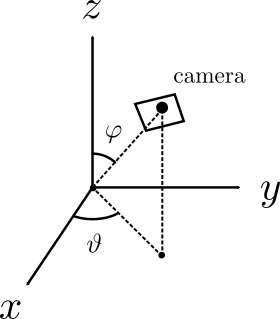
To control it, we used set_camera_orientation
to set its position and begin_ambient_camera_rotation
to begin an ambient rotation.
The used arguments phi (φ) and theta (ϑ) determine the position.
Besides the ThreeDAxes
object used to work with the 3D axes, Manim also contains a number of 3D primitives
that you can use to create more complex 3D scenes.
Translating and scaling objects in 3D behave just like you would expect (again using shift
and scale
).
Rotation is a bit trickier, since it isn’t entirely clear what should happen when rotating an object by a certain number of degrees.
It is quite an interesting topic and has a number of solutions (see Euler angles and Quaternions) if you’re interested; we’ll, however, use the most simple one: specify an axis that the object will rotate about.
There are a number of new classes that will be useful for creating the movement of the marble.
The main one is the CubicBezier
, which can be used to model the path and animated by MoveAlongPath
.
To create the moving and fading animation, you can use the custom MoveAndFade animation, the functionality of which will be covered in the upcoming series part.
Also, the rate functions from the previous part will come in handy to make the movement look believable.
frommanimimport*classMoveAndFade(Animation):def__init__(self,mobject:Mobject,path:VMobject,**kwargs):self.path=pathself.original=mobject.copy()super().__init__(mobject,**kwargs)definterpolate_mobject(self,alpha:float)->None:point=self.path.point_from_proportion(self.rate_func(alpha))# this is not entirely clean sice we're creating a new object# this is because obj.fade() doesn't add opaqueness but adds itself.mobject.become(self.original.copy()).move_to(point).fade(alpha)classBezierExample(Scene):defconstruct(self):point_coordinates=[UP+LEFT*3,# startingUP+RIGHT*2,# 1. controlDOWN+LEFT*2,# 2. controlDOWN+RIGHT*3,# starting]points=VGroup(*[Dot().move_to(position)forpositioninpoint_coordinates]).scale(1.5)# make control points bluepoints[1].set_color(BLUE)points[2].set_color(BLUE)bezier=CubicBezier(*point_coordinates).scale(1.5)self.play(Write(bezier),Write(points))# regular moving along pathcircle=(Circle(fill_color=GREEN,fill_opacity=1,stroke_opacity=0).scale(0.25).move_to(points[0]))self.play(FadeIn(circle,shift=RIGHT*0.5))self.play(MoveAlongPath(circle,bezier))self.play(FadeOut(circle))# moving along path with fadingcircle=(Circle(fill_color=GREEN,fill_opacity=1,stroke_opacity=0).scale(0.25).move_to(points[0]))self.play(FadeIn(circle,shift=RIGHT*0.5))self.play(MoveAndFade(circle,bezier))self.play(FadeOut(bezier),FadeOut(points),FadeOut(circle))
For additional information about the behavior of Bézier curves, I highly recommend Jason Davies’ incredible interactive website, which explains everything very elegantly.
frommanimimport*fromrandomimportchoice,seedclassMoveAndFade(Animation):def__init__(self,mobject:Mobject,path:VMobject,**kwargs):self.path=pathself.original=mobject.copy()super().__init__(mobject,**kwargs)definterpolate_mobject(self,alpha:float)->None:point=self.path.point_from_proportion(self.rate_func(alpha))# this is not entirely clean sice we're creating a new object# this is because obj.fade() doesn't add opaqueness but adds itself.mobject.become(self.original.copy()).move_to(point).fade(alpha)classBinomialDistributionSimulation(Scene):defcreate_graph(x_values,y_values):"""Build a graph with the given values."""y_values_all=list(range(0,(max(y_values)or1)+1))axes=(Axes(x_range=[-n//2+1,n//2,1],y_range=[0,max(y_values)or1,1],x_axis_config={"numbers_to_include":x_values},tips=False,).scale(0.45).shift(LEFT*3.0))graph=axes.plot_line_graph(x_values=x_values,y_values=y_values)returngraph,axesdefconstruct(self):seed(0xDEADBEEF2)# hezčí vstupy :)radius=0.13x_spacing=radius*1.5y_spacing=4*radiusn=9pyramid=VGroup()pyramid_values=[]# how many marbles fell where# build the pyramidforiinrange(1,n+1):row=VGroup()forjinrange(i):obj=Dot()# if it's the last row, make the rows numbers insteadifi==n:obj=Tex("0")pyramid_values.append(0)row.add(obj)row.arrange(buff=2*x_spacing)iflen(pyramid)!=0:row.move_to(pyramid[-1]).shift(DOWN*y_spacing)pyramid.add(row)pyramid.move_to(RIGHT*3.4)x_values=np.arange(-n//2+1,n//2+1,1)graph,axes=create_graph(x_values,pyramid_values)self.play(Write(axes),Write(pyramid),Write(graph),run_time=1.5)foriterationinrange(120):circle=(Circle(fill_opacity=1,stroke_opacity=0).scale(radius).next_to(pyramid[0][0],UP,buff=0))# go faster and fasterrun_time=(0.5ifiteration==0else0.1ifiteration==1else0.02ifiteration<20else0.003)self.play(FadeIn(circle,shift=DOWN*0.5),run_time=run_time*2)x=0foriinrange(1,n):next_position=choice([0,1])x+=next_positiondir=LEFTifnext_position==0elseRIGHTcircle_center=circle.get_center()# behave normally when it's not the last rowifi!=n-1:b=CubicBezier(circle_center,circle_center+dir*x_spacing,circle_center+dir*x_spacing+DOWN*y_spacing/2,circle.copy().next_to(pyramid[i][x],UP,buff=0).get_center(),)self.play(MoveAlongPath(circle,b,rate_func=rate_functions.ease_in_quad),run_time=run_time,)# if it is, animate fadeout and addelse:b=CubicBezier(circle_center,circle_center+dir*x_spacing,circle_center+dir*x_spacing+DOWN*y_spacing/2,pyramid[i][x].get_center(),)pyramid_values[x]+=1n_graph,n_axes=create_graph(x_values,pyramid_values)self.play(AnimationGroup(AnimationGroup(MoveAndFade(circle,b,rate_func=rate_functions.ease_in_quad),run_time=run_time,),AnimationGroup(pyramid[i][x].animate(run_time=run_time).become(Tex(str(pyramid_values[x])).move_to(pyramid[i][x])),graph.animate.become(n_graph),axes.animate.become(n_axes),run_time=run_time,),lag_ratio=0.3,))self.play(FadeOut(axes),FadeOut(pyramid),FadeOut(graph),run_time=1)
The rules are simple: we start in an initial state where some cells are dead and some are alive.
Each cell (besides the ones on the boundary) has 26 neighbours (all cells 1 away in space).
For each game, we define sets of rules X and Y, which determine when cells live and die.
In each step of the game, all cells at once change by the following rules:
if a cell is alive and its number of alive neighbours is in X, it survives, otherwise it dies
if a cell is dead and its number of alive neighbours is in Y, it gets revived, otherwise it stays dead
Basic variant
Implement a game with rules X={4,5},Y={5}.
Simulate it on a 163 board with a random initial state (p=0.2 for cells to be alive) and colors determining the position in 3D space.
I very much recommend rendering smaller areas first (say 83) on lower quality (l or m).
While the community version of Manim supports 3D rendering, it is not optimized for it and only uses the processor to render the frames.
If you’re interested in faster rendering, I would suggest you take a look at ManimGL, which is actively developed by Grant Sanderson and supports interactive animations, but its documentation is practically non-existent and will differ from the code covered in this series in a lot of ways.
Cell age
We’ll define a new parameter Z, which determines the “liveness” of a cell.
The liveness of a new cell is Z and gets decremented each step of the simulation.
The cell can now only die when its liveness is 1, otherwise it is considered alive.
If it survives with liveness 1, its liveness stays at 1.
Implement a game with rules X={2,6,9}, Y={4,6,8,9} and Z=10.
The colors are determined by the age of the cells.
frommanimimport*fromrandomimportrandom,seedfromenumimportEnum# inspired by https://softologyblog.wordpress.com/2019/12/28/3d-cellular-automata-3/classGrid:classColorType(Enum):FROM_COORDINATES=0FROM_PALETTE=1def__init__(self,scene,grid_size,survives_when,revives_when,state_count=2,size=1,palette=["#000b5e","#001eff"],color_type=ColorType.FROM_PALETTE,):self.grid={}self.scene=sceneself.grid_size=grid_sizeself.size=sizeself.survives_when=survives_whenself.revives_when=revives_whenself.state_count=state_countself.palette=paletteself.color_type=color_typeself.bounding_box=Cube(side_length=self.size,color=GRAY,fill_opacity=0.05)self.scene.add(self.bounding_box)deffadeOut(self):self.scene.play(FadeOut(self.bounding_box),*[FadeOut(self.grid[index][0])forindexinself.grid],)def__index_to_position(self,index):"""Convert the index of a cell to its position in 3D."""dirs=[RIGHT,UP,OUT]# be careful!# we can't just add stuff to ORIGIN, since it doesn't create new objects,# meaning we would be moving the origin, which messes with the animationsresult=list(ORIGIN)fordir,valueinzip(dirs,index):result+=(((value-(self.grid_size-1)/2)/self.grid_size)*dir*self.size)returnresultdef__get_new_cell(self,index):"""Create a new cell"""cell=(Cube(side_length=1/self.grid_size*self.size,color=BLUE,fill_opacity=1).move_to(self.__index_to_position(index)),self.state_count-1,)self.__update_cell_color(index,*cell)returncelldef__return_neighbouring_cell_coordinates(self,index):"""Return the coordinates of the neighbourhood of a given index."""neighbourhood=set()fordxinrange(-1,1+1):fordyinrange(-1,1+1):fordzinrange(-1,1+1):ifdx==0anddy==0anddz==0:continuenx=index[0]+dxny=index[1]+dynz=index[2]+dz# don't loop around (although we could)if(nx<0ornx>=self.grid_sizeorny<0orny>=self.grid_sizeornz<0ornz>=self.grid_size):continueneighbourhood.add((nx,ny,nz))returnneighbourhooddef__count_neighbours(self,index):"""Return the number of neighbouring cells for a given index (excluding itself)."""total=0forneighbour_indexinself.__return_neighbouring_cell_coordinates(index):ifneighbour_indexinself.grid:total+=1returntotaldef__return_possible_cell_change_indexes(self):"""Return the indexes of all possible cells that could change."""changes=set()forindexinself.grid:changes|=self.__return_neighbouring_cell_coordinates(index).union({index})returnchangesdeftoggle(self,index):"""Toggle a given cell."""ifindexinself.grid:self.scene.remove(self.grid[index][0])delself.grid[index]else:self.grid[index]=self.__get_new_cell(index)self.scene.add(self.grid[index][0])def__update_cell_color(self,index,cell,age):"""Update the color of the specified cell."""ifself.color_type==self.ColorType.FROM_PALETTE:state_colors=color_gradient(self.palette,self.state_count-1)cell.set_color(state_colors[age-1])else:defcoordToHex(n):returnhex(int(n*(256/self.grid_size)))[2:].ljust(2,"0")cell.set_color(f"#{coordToHex(index[0])}{coordToHex(index[1])}{coordToHex(index[2])}")defdo_iteration(self):"""Perform the automata generation, returning True if a state of any cell changed."""new_grid={}something_changed=Falseforindexinself.__return_possible_cell_change_indexes():neighbours=self.__count_neighbours(index)# alive rulesifindexinself.grid:cell,age=self.grid[index]# always decrease ageifage!=1:age-=1something_changed=True# survive if within range or age isn't 1ifneighboursinself.survives_whenorage!=1:self.__update_cell_color(index,cell,age)new_grid[index]=(cell,age)else:self.scene.remove(self.grid[index][0])something_changed=True# dead ruleselse:# revive if within rangeifneighboursinself.revives_when:new_grid[index]=self.__get_new_cell(index)self.scene.add(new_grid[index][0])something_changed=Trueself.grid=new_gridreturnsomething_changedclassGOLFirst(ThreeDScene):defconstruct(self):seed(0xDEADBEEF)self.set_camera_orientation(phi=75*DEGREES,theta=30*DEGREES)self.begin_ambient_camera_rotation(rate=-0.20)grid_size=16size=3.5grid=Grid(self,grid_size,[4,5],[5],state_count=2,size=size,color_type=Grid.ColorType.FROM_COORDINATES,)foriinrange(grid_size):forjinrange(grid_size):forkinrange(grid_size):ifrandom()<0.2:grid.toggle((i,j,k))grid.fadeIn()self.wait(1)foriinrange(50):something_changed=grid.do_iteration()ifnotsomething_changed:breakself.wait(0.2)self.wait(2)grid.fadeOut()classGOLSecond(ThreeDScene):defconstruct(self):seed(0xDEADBEEF)self.set_camera_orientation(phi=75*DEGREES,theta=30*DEGREES)self.begin_ambient_camera_rotation(rate=0.15)grid_size=16size=3.5grid=Grid(self,grid_size,[2,6,9],[4,6,8,9],state_count=10,size=size,color_type=Grid.ColorType.FROM_PALETTE,)foriinrange(grid_size):forjinrange(grid_size):forkinrange(grid_size):ifrandom()<0.3:grid.toggle((i,j,k))self.wait(2)foriinrange(70):something_changed=grid.do_iteration()ifnotsomething_changed:breakself.wait(0.1)self.wait(2)grid.fadeOut()

 Plotting and 3D Scenes